Guide Author: Katsu- [FAFMeme]
About the Guide
This guide was built as a definitive starting point for any FAF player. It is not just a curated list of top-tier mods: extensive testing went into breaking down each mod's inner mechanics, highlighting hidden pitfalls, and explaining essential setup tweaks.
The main driver behind this guide is the severe lack of up-to-date modding documentation. For years, the community had to rely on ancient YouTube videos regurgitating the same outdated mod lists in random order, with zero practical explanation of "why", "how", or what might break.
Core Principles of This Guide:
- No duplicates: inferior alternatives and outdated clones simply did not make the cut. If a mod is listed here, it is the best and most relevant in its category.
- Full compatibility: every mod in this guide has been thoroughly tested together. You can install the entire list without experiencing crashes or mod conflicts.
- Total modularity: I am not enforcing a rigid "one-size-fits-all" pack. This is an open toolkit designed for you to assemble and tailor an ideal UI for your personal playstyle.
- Transparent information: no hidden catches - all obscure mechanics and bugs are explained openly.
If you are planning a complete overhaul of your mod setup, we strongly recommend deleting your old Game.prefs file and configuring your settings fresh. Over time, the game engine accumulates leftover configuration bloat from uninstalled mods that does not clean itself up and often causes phantom bugs.
Installation Guide: Where & How to Install Mods
For most mods, simply copy the mod name, search for it in the FAF client's Vault tab, and click install.
Manual mod installation instructions:
- Launch the FAF client.
- In the top-left corner, click the menu button (three horizontal bars).
- In the dropdown menu, select "Show mod folder" (opens the system
modsdirectory). - Copy the unpacked mod folders directly into the
modsfolder.
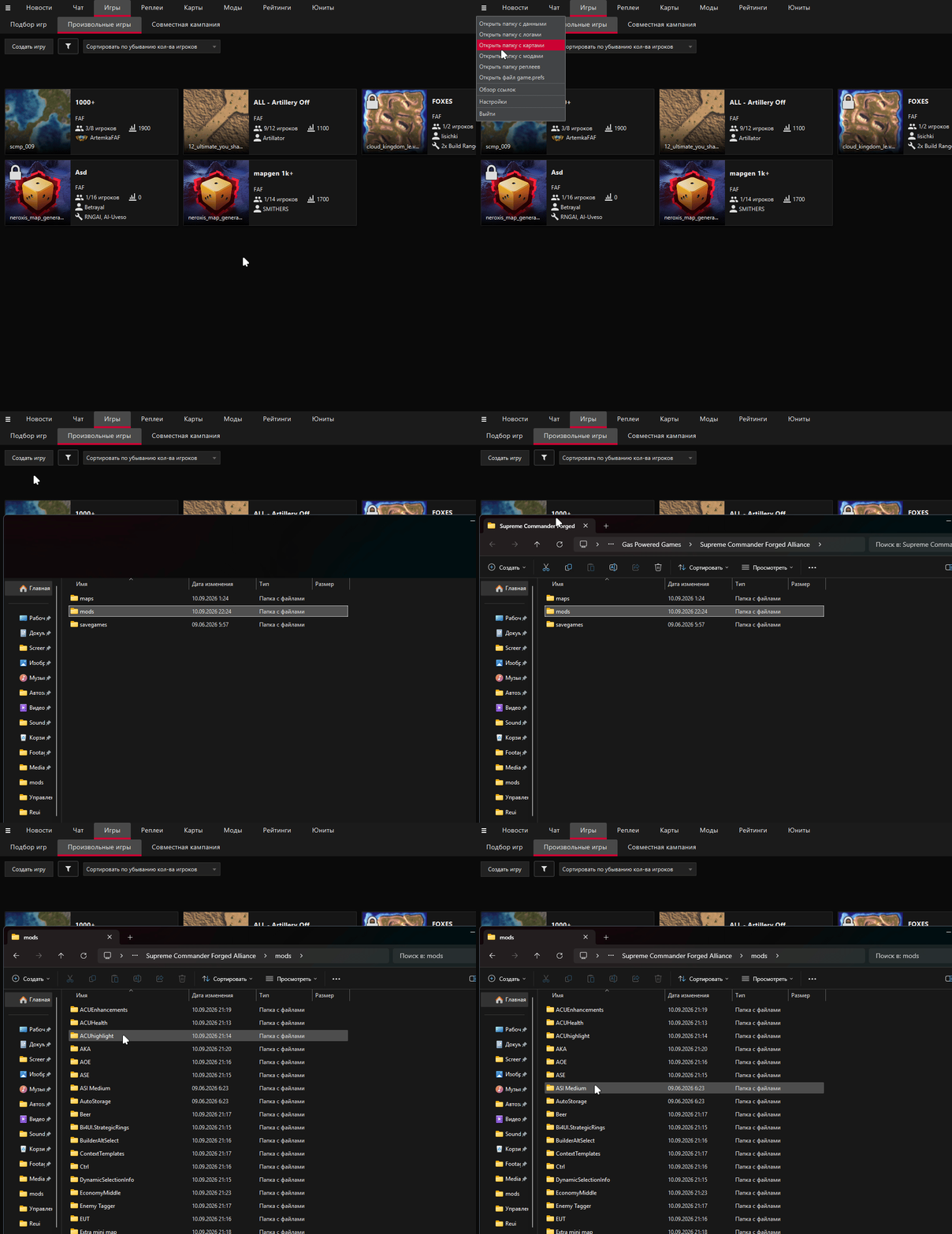
You must place extracted mod folders into the mods directory, NOT downloaded .zip or .rar archive files. The root of each individual mod folder must directly contain a mod_info.lua file.
Downloads & Backup Archive
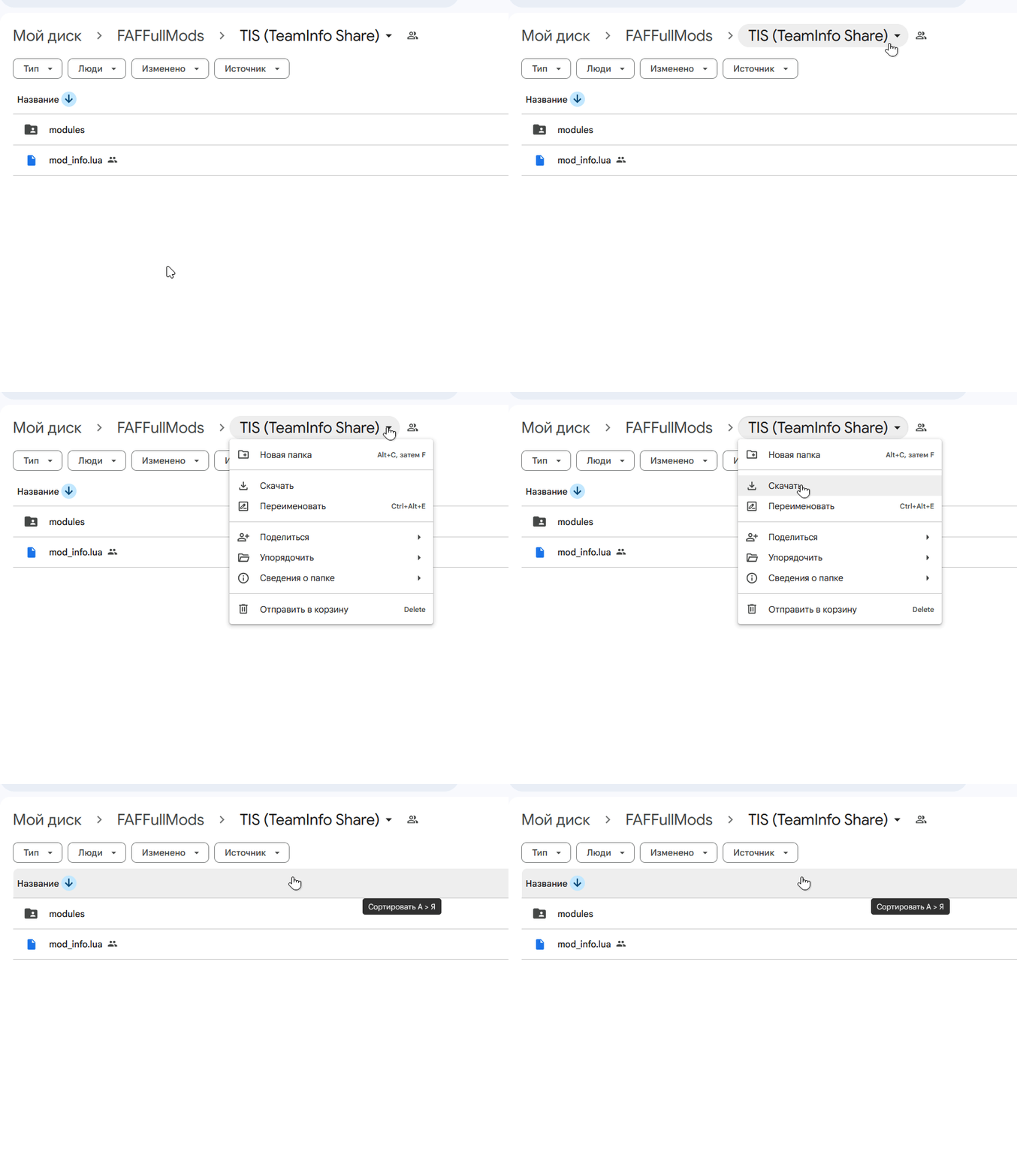
All verified, working versions featured in this guide are backed up in a single cloud folder:
📁 Download Full Mod Archive (Google Drive)
Avoid downloading mods one by one: open the link → click the arrow next to the folder name at the top center → select "Download". Google Drive will automatically pack everything into a single zip file.
Mod Index
Legend:
📦 - Manual installation (via archive) (Archives are located next to the mod descriptions)
🧩 - Requires dependencies (libraries)
Visuals
Strategic Icons (install only one of your choice):
- 📦 ASI Medium
- Calibers Icons
- Redux Strategic Icons
General:
- ACU HP Monitor - dedicated panel tracking Commander HP
- 🧩 Idle Engineers Light - highlights idle builders and queue status
- ACUhighlight - circular highlight ring around your Commander
- 🧩 DynamicSelectionInfo - detailed unit stats overlay on hover
Tactical
- 🧩 Rings For All - range previews for weapons, radar, and construction on hold
- Specific Target Priorities - rapid priority switching by unit category or specific unit
- Bi4UI.StrategicRings - permanent on-map weapon and vision range rings
Selection & Unit Control
- 🧩 Advanced Selection Extension - smart selection filters and domain toggles
- 🧩 Group Scatter - distributes sequential commands across grouped units
- 🧩 Additional Orders Extension - QoL hotkeys for factories and Commander
- BuilderAltSelect - modifier hotkeys for engineer-only and factory-only box selection
- 🧩 Ctrl - sticky move orders and structure eyedropper tool
- 🧩 Instant Assist - instant engineer assist without re-orienting delays
Economy & Construction
- 🧩 Eco UI Tools - mex tracker panel and auto-upgrade controls
- Beer - audio cues for mex upgrade progress (auditory economy)
- 📦 AutoStorage - hotkey-based mass storage & fab capping around mexes
- 🧩 Context Templates - contextual building template picker
Teamplay & Intel
- 🧩 TeamInfo Share - allied status for nukes, SMD, and experimentals
- Reveal positions - displays player spawns and nicknames in opti-balance
- Strategic Missile Construction Alerts - text alerts for ready nukes
UI & Quality of Life
- Extra mini map - borderless minimalist minimap
- ZeP_MiniMapZoom - auto-hides minimap at maximum zoom-out
ReUI Ecosystem (4z0t)
Modular interface framework. Requires the base ReUI core installed:
- ReUI.ActionsPanel (+ extensions) - dock for ACU upgrades, missiles, and templates
- ReUI.Score - revamped scoreboard with one-click unit and resource transfers
- ReUI Reclaim - reclaim label clustering and total mass counter
- 📦ReUI.Hotbuild - advanced custom cycle-bind builder
- ReUI.Construction - drag-and-drop factory queues and template preview
- ReUI.Economy - resource bar scaling and screen centering